

 水彩, 刷子, 模式, 样式, 矢量, 油漆, 艺术, 艺术性, 行程, 束, 套件, 包装, Diy
编号 :watercolor-magic-volume-1-EMYZRD
水彩, 刷子, 模式, 样式, 矢量, 油漆, 艺术, 艺术性, 行程, 束, 套件, 包装, Diy
编号 :watercolor-magic-volume-1-EMYZRD
支持的软件Adobe Photoshop
文件格式ABR, PAT, ASL, AI, EPS, PSD
水彩魔术只用鼠标按钮就可以捕捉手绘设计的美丽和真实性。
此合集资源包括包括15种逼真的水彩Photoshop样式,25种手工Photoshop笔刷,15种无缝Photoshop图案,31种手绘矢量,以及将它们全部组合在一起的能力。
水彩魔术卷1使您可以自由地以多种不同方式组合图案,样式和矢量。
将包含的矢量(或您自己的矢量)与图层样式结合使用,以创建真实的水彩形状,或简单地将样式应用于文本以形成手工外观。
在不同的图层上盖章并覆盖水彩笔,然后对每个笔触应用独特的样式,以实现您所见过的最逼真的水彩效果。
样式是为在样式中使用而创建的,但是您也可以将它们用作任何大小的独立背景,因为它们平铺时没有任何可见的接缝。
PS笔刷文件使用教程
【PS笔刷安装说明】PS笔刷文件.abr怎么导入Photoshop+使用教程
PS样式文件使用教程
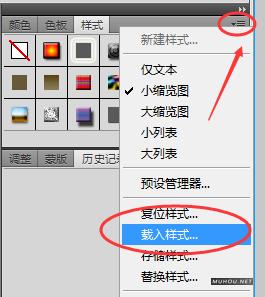
【PS样式安装说明】PS样式文件.asl怎么导入Photoshop+使用教程
EPS文件使用教程:
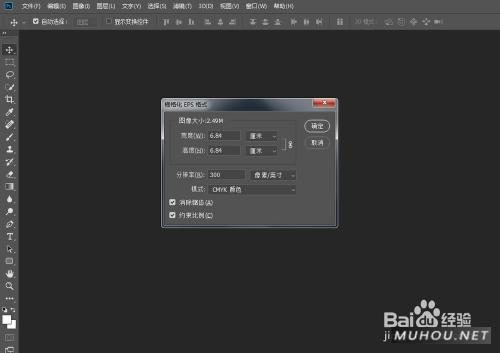
【AI图形使用教程】Illustrator 文件.eps格式怎么打开
Watercolor Magic captures the beauty and authenticity of hand painted design using nothing but your mouse button.
This bundle includes 15 realistic watercolor Photoshop styles, 25 handmade Photoshop brushes, 15 seamless Photoshop patterns, 31 hand drawn vectors, and the ability to combine them all with minimal effort.
Watercolor Magic Volume 1 gives you the freedom to combine patterns, styles, and vectors in a plethora of different ways.
Use the included vectors (or your own) combined with the layer styles to create authentic watercolor shapes, or simply apply the styles to text for a handmade look.
Stamp and overlay the watercolor brushes on different layers, then apply unique styles to each stroke for the most realistic watercolor effects you've ever seen.
The patterns were created for use within the styles, but you can also use them as standalone backgrounds of any size since they tile without any visible seams.
There's no better collection for creating things like wedding invitations, thank you cards, or other projects requiring a handmade look and feel.


[template id="20595"]

